Search for answers or browse our knowledge base.
Getting starter
How NursED works
NursED portfolios can in some markets be distributed as standalone products that students can purchase for themselves. In some markets the portfolios can be bought by academic institutions as well.
In case the student buys an individual license, the portfolios do not require implementation at the institutional level, nor do educational institutions need to use the Workseed learning environment. The portfolios do not cost anything for the institution, and teachers can register on the platform for free.
The portfolio is also a personal product that remains available to the student even if they change institutions.
However, we recommend that students discuss the use of the portfolio with their teacher and follow their institution’s general practices for documenting and guiding workplace learning.
Ordering the portfolio
In case the portfolios are available for individual purchase in your market, students can order a portfolio from our online store.
You can find the available portfolios and their prices here. To order a portfolio, accept the terms of use and proceed to the shopping cart by clicking the “Order Now” button.
Please note that digital portfolios do not have a right of exchange or return under the Consumer Protection Act.
Fill in the shopping cart details and complete the payment. Once the payment is registered, you will receive a confirmation email containing your portfolio activation code and instructions for registering your user account.
The confirmation message is sent almost immediately after placing the order. If you cannot find the message, please check your spam folder.
If you encounter issues with registration or logging in, you can contact support@nursed.fi.
The portfolio can also be ordered on behalf of a user. If the purchaser and the user are different people, it is sufficient to forward the registration link to the user.
Creating a User Account
After placing your order, you will receive a confirmation email containing a registration link and an activation code. Please note that the activation code is personal and can only be used once.
Use the link to go to the registration page. First, enter your personal (not institutional) email address that you want to use for registration. If an account already exists with that email, you will be automatically redirected to the login page.
To register, simply enter your name and choose a password. After that, enter your activation code on the platform and click “Check Activation Code”. If the code is valid, click “Use Activation Code” to complete the process.
If the code does not work as expected, you can request assistance at support@nursed.fi.
Logging In
You can log in to the platform by going directly to edu.nursed.fi/login or by first visiting nursed.fi and clicking the LOG IN button in the top-right corner of the site.

In the login view, you can sign in using the email address and password you created during registration. If you have linked your NursED portfolio to a Workseed account, you can log in normally through Workseed.

If you have forgotten your password, you can reset it using your email address.
Link Your NursED Account to Workseed
NursED portfolios can be used independently with a separate login, but if you already have a user account in the Workseed learning environment, you can link the accounts and use the NursED portfolio directly through Workseed.
You can link the accounts after registration in the “My Account” settings. Note that you can only link the accounts by logging in with your Workseed credentials, not your NursED credentials.
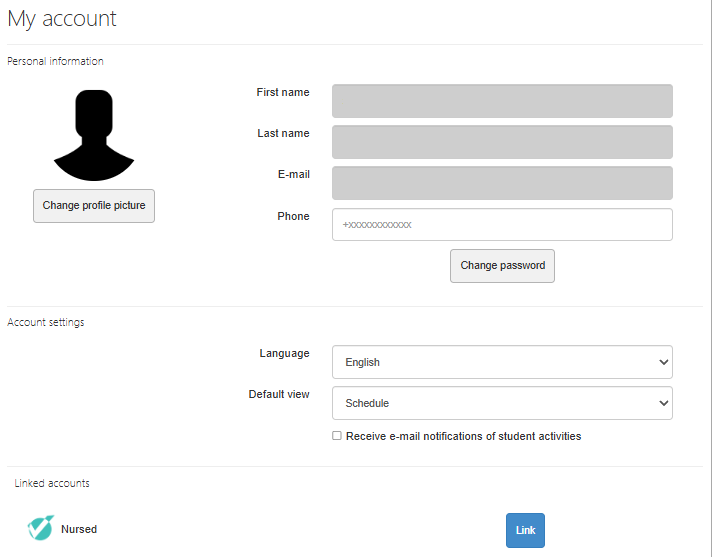
You can find the NursED account section at the bottom of the “My Account” view. Click “Link” and enter your NursED account login details. If needed, you can also unlink the accounts from the same view.
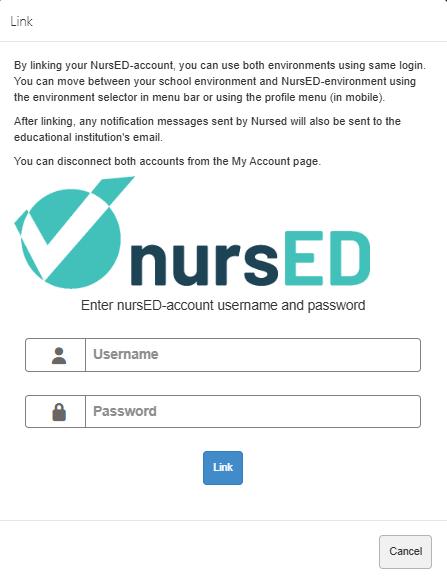
After linking, you can access NursED portfolios from Workseed by selecting “Nursed (linked)” from the environment menu on the left side of the “My Profile” page.